When choosing a baby room camera, prioritize reliability, clear night vision, easy setup, and trusted privacy options. This guide highlights five top options that balance real‑time viewing, privacy, and features for different types of buyers. Best for budget-conscious parents, best for off-wi-fi setups, best for multi-room monitoring, and more, these picks cover a range of needs from simple audio alerts to full 2K/4K footage.
Summary of selected products:
| Product | Best For | Key Benefit |
|---|---|---|
| TP-Link Tapo C100 | Budget-friendly baby monitor | Motion alerts and 2‑way audio with night vision |
| HelloBaby HB6550 Upgrade | WiFi-free, two-camera setup | Non‑WiFi use with long range and secure FHSS |
| GoodBaby 5″ Monitor | All‑in‑one non-smart display | Large screen with remote pan/tilt and long battery |
| HelloBaby HB6550-2 | Two-camera monitoring | Two cameras on a single 5″ display |
| eufy Security 4K E30 | High‑end, feature-rich setup | 4K recording with AI detection and 360° view |
TP-Link Tapo 1080P Indoor Camera For Baby Monitor (C100)

Best for: budget-conscious families needing solid basic monitoring. This camera offers motion detection and instant notifications, plus 2‑way audio and night vision to keep tabs on the baby day and night. The built‑in siren can deter mischief if needed. It works with Alexa and Google Home, which helps integrate it into a smart nursery routine.
Why selected: It delivers essential monitoring features without added subscription requirements. The 30‑ft night vision helps you see clearly in dim rooms, and the motion alerts help you distinguish between a restless baby and ordinary room activity. The compact form factor makes it easy to place on a dresser or shelf.
Best for: parents seeking a simple, privacy‑friendly, no‑frills setup that still provides reliable alerts and two‑way talk. Caution: Full functionality relies on a stable 2.4 GHz Wi‑Fi connection; performance may vary with network quality.
HelloBaby No WiFi Baby Monitor 5″ Screen HB6550

Best for: caregivers who want a self-contained, WiFi‑free experience with a single built‑in display. Ideal for apartments or rooms where WiFi stability is a concern. The 5″ color display and 355° pan/120° tilt give a broad view of the nursery.
Why selected: The non‑WiFi design reduces hacking risk and removes dependency on internet service. Its long remote range supports use across larger homes. However, this model is most suitable for setups that prioritize a dedicated monitor over cloud features.
Caution: For best performance, ensure the FHSS private link remains stable; large houses may require additional receivers for full coverage.
GoodBaby 5″ Baby Monitor With Camera And Audio

Best for: families wanting a larger display in a non‑WiFi setup with long battery life. The 5″ HD screen shows a clear image, while the remote 355° pan and 120° tilt cover most of the nursery in one view. It includes eight built‑in lullabies for quick soothing sessions.
Why selected: The long battery life ensures monitoring through longer naps and night hours without frequent recharges. VOX mode helps conserve power while staying alert to crying. It offers practical features for parents who value a reliable dedicated monitor with straightforward operation.
Limitation: Some users may prefer cloud storage or multiple camera support outside of this single‑unit configuration.
HelloBaby Upgrade 5” No-WiFi Monitor With 2 Cameras HB6550-2
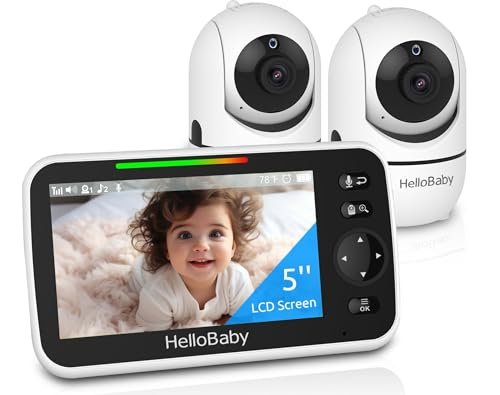
Best for: households needing two rooms monitored simultaneously. A single 5″ display toggles between two pre‑connected cameras, with remote pan/tilt/zoom. This setup suits growing families or shared nursery spaces where different angles matter.
Why selected: No‑WiFi operation with a secure private link reduces exposure to online risks. The 1000 ft outdoor range enhances flexibility for larger homes or multi‑room layouts. It’s easy to set up and expand later with additional cameras if supported.
Warning: If you plan to add more cameras, verify compatibility and camera pairing steps to avoid connection delays.
eufy Security 4K Indoor Camera E30

Best for: high‑end nurseries that demand sharp 4K video, AI-driven detection, and autonomous tracking. The 360° pan/tilt helps cover more space, while AI‑powered detection distinguishes humans, pets, and crying sounds for focused alerts.
Why selected: On‑device AI reduces unnecessary notifications, and 24/7 recording delivers a comprehensive activity log. It works with HomeKit for those using Apple ecosystems. The combination of 4K detail and smart tracking makes it a robust option for tech‑savvy households.
Caution: Premium features may require compatible apps or services; verify privacy and data handling settings during setup.
Buying Guide: Choosing The Right Baby Room Camera
- Connectivity: Do you prefer WiFi-based cameras for remote viewing, or a no‑WiFi system for privacy and reliability? WiFi options offer cloud access and smartphone alerts, while non‑WiFi options emphasize local monitoring and lower cybersecurity risk.
- Video Quality: Consider room lighting and your need for detail. 1080p is standard; 2K/4K provides clearer detail, especially useful to distinguish faces or tiny movements, but may require more bandwidth and storage.
- Viewing Method: A dedicated monitor is simple and private; multiple cameras on a single display help compare rooms; mobile apps allow viewing from anywhere with internet access.
- Two-way Audio: This is essential for soothing a baby or communicating with another caregiver. Look for clarity and latency in the audio path.
- Storage: Decide between local SD cards, cloud storage, or both. Local storage is offline, while cloud storage provides history and extra features like motion analytics.
- Privacy Features: Check for secure connections, encryption, and privacy modes. For WiFi cameras, ensure you can disable live streaming when not in use.
- Battery Life and Range: For wireless models, battery life affects how often you need to recharge. Indoor range impacts coverage in larger homes or split nurseries.
- Ease of Use: Consider setup complexity, app usability, and whether the device offers straightforward parental controls and alerts.
FAQ
- What is the best camera for a WiFi-enabled nursery?
– A model with reliable motion detection, strong night vision, and easy app access is ideal. The 2K or 4K options provide clearer images, though you should ensure your network can handle the bandwidth. - Should I use a no‑WiFi baby monitor?
– No‑WiFi monitors reduce online exposure and are simple to operate, but they usually support fewer features like cloud storage or remote viewing. - Is two‑camera monitoring worth it?
– Yes, if you want to monitor multiple rooms or angles simultaneously. It helps ensure you don’t miss events in different parts of the nursery or adjacent spaces. - How important is privacy for baby monitors?
– Very important. If a camera supports encryption, private links, and easy disable/privacy modes, it reduces the risk of unauthorized access. - What should I consider about storage?
– Local storage is private but limited by card size. Cloud storage offers longer history and advanced features but may involve ongoing costs. - Are smart features like crying detection reliable?
– AI‑based detections can help filter alerts, but they may occasionally misinterpret sounds. Use them as a guide, not a sole alert method.