Looking for the best baby monitor for crib use? This guide highlights five dependable options that balance video clarity, battery life, ease of use, and privacy. Each pick targets different caregiver needs: no-wuss features for busy parents, Wi‑Fi enabled viewing for remote comfort, and secure non‑Wi‑Fi models for privacy-minded households. The buyer’s notes below help you decide who benefits most from each model.
Summary table of selected products:
| Product | Key Strengths | Best For |
|---|---|---|
| Dr.Care VistaView 5” | 2K camera, smart alerts, long battery, multi-user | Parents wanting high-resolution video and flexible viewing with app access |
| NUOTUN Baby Monitor | No WiFi, 2.4GHz, long range, easy crib mounting | Privacy-focused households needing offline monitoring |
| HelloBaby HB6550 | 5″ screen, long battery, 355° pan/120° tilt | Parents who want a big display and strong local control |
| NETVUE Peekababy | 4‑in‑1 mounting options, 2.4GHz app access, two‑way talk | Flexible crib setups and remote app monitoring |
| Nanit Pro | Sleep insights, 1080p, customizable alerts | Parents seeking sleep coaching and growth monitoring |
Dr.Care VistaView 5” Smart WiFi Baby Monitor
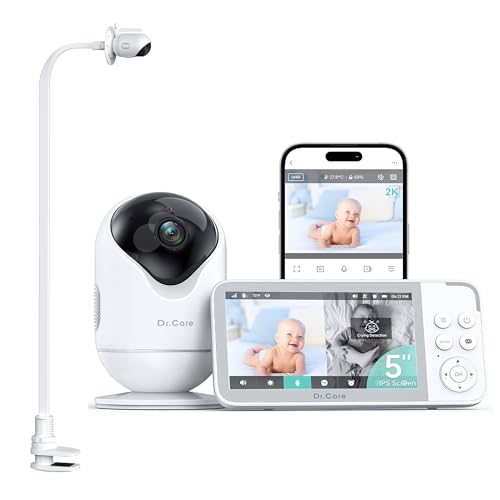
The Dr.Care VistaView combines a 2K camera with app control and multi-user capabilities. Best for caregivers who want crisp daytime and nighttime imagery with remote access from a phone or tablet. The 2K resolution and optional 1080P split-screen help you observe breathing, movements, and small details from anywhere. Real-time alerts cover motion, crying, temperature, and humidity for around‑the‑clock peace of mind. The two-way talk feature supports soothing and response from a distance.
Who it’s best for: families who want high‑quality video and broad access for multiple caregivers. Why selected: it pairs rich video with robust alerts and a flexible mounting system for diverse crib setups. Caution: data privacy depends on consistent app security and network reliability.
NUOTUN Baby Monitor With Camera And Audio
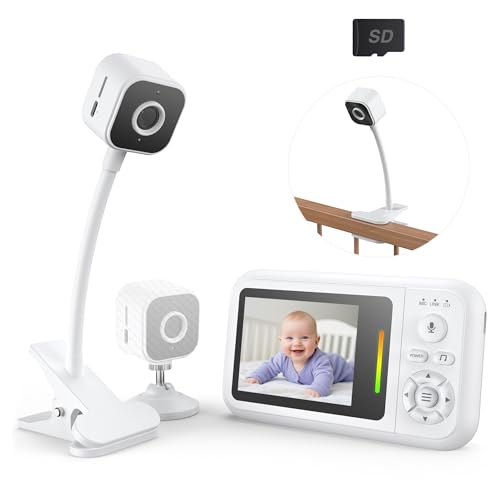
NUOTUN offers a no‑WiFi setup with a stable 2.4GHz connection and a compact 2.8” monitor. It ships with dual flexible stands and a secure clip for crib mounting. The 940nm night vision provides clear visuals without bright LEDs, and the 4X digital zoom lets you catch subtle movements. This is an excellent choice when privacy and a straightforward, offline viewing experience are priorities.
Who it’s best for: privacy‑minded households that prefer an offline solution without monthly fees. Why selected: strong local connection, flexible mounting, and long battery‑life support. Caution: range and performance depend on the physical environment and interference.
HelloBaby No WiFi Baby Monitor With 5″ Screen HB6550

The HelloBaby HB6550 provides a dedicated 5″ display with remote pan and tilt, 2‑way audio, and night vision. It operates without WiFi, making it a straightforward, self-contained monitoring solution. The 30‑hour battery life helps during overnight use, and lullabies are included for soothing. The device supports a wide viewing angle to minimize blind spots.
Who it’s best for: parents seeking a larger, local display and longer battery life without online connectivity. Why selected: clear, simple interface with strong out‑of‑the‑box usability. Caution: non‑WiFi models lack remote viewing when you’re away from home.
NETVUE Peekababy Baby Camera

NETVUE Peekababy emphasizes flexible mounting with an adjustable 4‑in‑1 stand that adapts to crib types and room layouts. It uses 2.4GHz Wi‑Fi for app connectivity and supports two‑way talk for remote reassurance. The absence of a built‑in screen means you view on your phone or tablet, which can be a benefit for parents who prefer mobile access and ongoing app updates.
Who it’s best for: households wanting flexible mounting and mobile app monitoring. Why selected: adaptable mounting and straightforward app integration. Caution: requires a compatible smartphone and stable Wi‑Fi for best performance.
Nanit Pro Smart Baby Monitor

Nanit Pro stands out with sleep insights, automatic tracking, and a 1080p stream. It offers AI‑powered sleep coaching, long‑term trends, and customizable alerts for motion, sound, temperature, and humidity. This monitor is designed for parents who want more than live video—a proactive approach to establishing healthy sleep patterns.
Who it’s best for: families seeking sleep analytics and ongoing guidance for routines. Why selected: advanced monitoring features with practical insights. Caution: premium features rely on app connectivity and may require ongoing setup for optimal alerts.
Buying Guide
What to prioritize when choosing a crib monitor
- Connectivity: Do you prefer no‑WiFi models for privacy, or are you comfortable with cloud‑based viewing and alerts?
- Display: Is a dedicated screen important, or can you use a smartphone app for viewing?
- Camera quality: Look for 1080p or higher for clear detail; 2K is a bonus in some models.
- Field of view and mounting: Check tilt, rotation, and mounting options to cover the crib area you care about.
- Battery life: Longer life helps during nightly use; consider models with removable batteries if you travel.
- Alerts and environment sensing: Temperature, humidity, and motion/sound alerts add useful context for baby care.
- Privacy and security: Favor reputable brands and ensure strong encryption and separate networks when possible.
Which features justify higher cost
- Higher resolution cameras (2K/1080p) for finer detail in sleep zones and breathing indicators.
- Smart tracking and sleep analytics that translate data into practical routines.
- Flexible mounting and long battery life for convenience and placement options.
- Two‑way audio, lullabies, and white noise to soothe the baby without leaving your seat.
Questions to ask before purchasing
- Does your home support a reliable Wi‑Fi setup, or do you need an offline option?
- How many caregivers need access, and should the monitor support multiple users?
- What is the optimal screen size or preference for a phone-based viewing experience?
- How important are night vision quality and color accuracy in low light?
Privacy and security tips
- Change default passwords and enable two‑factor authentication where available.
- Regularly update firmware to protect against known vulnerabilities.
- Use a separate guest network for smart home devices when possible.
FAQ
- What is the benefit of a non‑WiFi monitor? It reduces exposure to online hacking and keeps data local.
- How many caregivers should have access to a monitor? Choose a model that supports multiple users if more than one person checks on the baby.
- Is a bigger display always better? A larger screen helps in quick viewing, but a reliable smartphone app can offer similar visibility.
- Can monitors help with sleep coaching? Some models provide sleep insights and trends to inform routines.
- Do all monitors require an internet connection? No, several listed options function offline with secure local transmission.
- What should I do if I notice false alerts? Verify sensor zones and adjust sensitivity, or disable nonessential alerts.